
HP ProLiant ML370 Generation 3 Setup and Installation Guide

Installing Hardware Options
HP ProLiant ML370 Generation 3 Server Setup and Installation Guide 3-41
HP CONFIDENTIAL
Writer: Jennifer Hayward File Name: d-ch03 Installing Hardware Options.doc
Codename: Dizzy Devil Part Number: 281992-002 Last Saved On: 12/3/02 12:45 PM
Installing a Hot-Plug SCSI Hard Drive
To install a hot-plug SCSI hard drive:
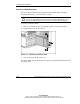
1. Identify an available slot with the next lowest SCSI ID number. Refer to “SCSI
IDs” in this chapter.
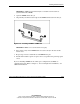
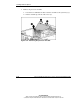
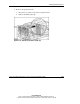
2. Press the port-colored release button (1).
3. Open the ejector lever (2).
4. Insert the hard drive into the available drive bay (3). Be sure that the drive seats
firmly into the connector on the SCSI backplane.
5. Close the ejector lever to secure the drive in the drive cage (4).
Figure 3-32: Installing a hot-plug SCSI hard drive
NOTE: If you backed up data before replacing a drive, restore the server data from the
backup.
6. Use the hot-plug SCSI hard drive LEDs to identify the status of the installed
drive. For more information about hard drive LEDs, refer to “Hot-Plug SCSI
Hard Drive LEDs” in Appendix E.
7. Resume normal server operations.