
HP ProLiant ML370 Generation 3 Setup and Installation Guide

Installing Hardware Options
HP ProLiant ML370 Generation 3 Server Setup and Installation Guide 3-23
HP CONFIDENTIAL
Writer: Jennifer Hayward File Name: d-ch03 Installing Hardware Options.doc
Codename: Dizzy Devil Part Number: 281992-002 Last Saved On: 12/3/02 12:45 PM
CAUTION: Always install a PPM when you install a processor. The system fails to
boot if the processor or PPM are missing.
IMPORTANT: When you install a second processor and PPM, the processor must be the
same type and speed as the primary processor. Install only the PPM provided in the option kit
with the processor.
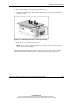
NOTE: The appearance of compatible PPMs may vary.
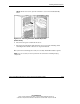
Observe the warnings and cautions provided in the option kit documentation and in
this guide. To install the processor assembly:
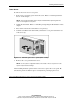
1. Power down the server. Refer to “Powering Down the Server” in this chapter.
2. Remove the access panel. Refer to “Removing the Access Panel” in this chapter.
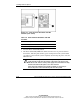
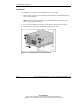
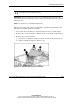
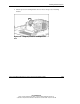
3. Remove the processor air baffle:
a. Loosen the two thumbscrews that secure the air baffle to the system tray (1).
b. Lift the air baffle up and out of the server (2).
Figure 3-18: Removing the processor air baffle