
HP ProLiant ML370 Generation 3 Setup and Installation Guide

Installing Hardware Options
HP ProLiant ML370 Generation 3 Server Setup and Installation Guide 3-21
HP CONFIDENTIAL
Writer: Jennifer Hayward File Name: d-ch03 Installing Hardware Options.doc
Codename: Dizzy Devil Part Number: 281992-002 Last Saved On: 12/3/02 12:45 PM
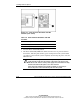
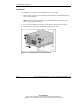
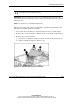
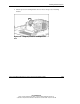
4. Press down on the access panel latch to unlock it (1).
5. Continue to hold the latch down while you slide the access panel toward the rear
of the server (2).
Figure 3-17: Removing the access panel (rack server)
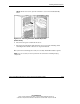
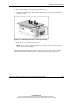
6. Remove the access panel from the server.
NOTE: Use the system configuration labels on the inside of the access panel to locate
system components and settings.
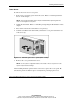
After installing hardware options for the rack server, replace the access panel. Be
sure that the panel is locked into place securely before powering up the server.