
HP ProLiant ML370 Generation 3 Setup and Installation Guide


Installing Hardware Options
HP ProLiant ML370 Generation 3 Server Setup and Installation Guide 3-9
HP CONFIDENTIAL
Writer: Jennifer Hayward File Name: d-ch03 Installing Hardware Options.doc
Codename: Dizzy Devil Part Number: 281992-002 Last Saved On: 12/3/02 12:45 PM
Locating the Torx T-15 Tool
A Torx T-15 tool is provided with the tower or rack server and is located on the rear
panel. Use this tool to assist with installing options as directed in the option
documentation. Specific uses include:
• Removing a power supply blank
• Removing the auxiliary SCSI blank
• Installing an auxiliary VHDCI SCSI cable
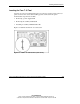
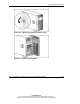
Figure 3-8 identifies the Torx T-15 tool location.
Figure 3-8: Torx T-15 tool location (rack server)