
HP ProLiant ML370 Generation 3 Setup and Installation Guide


Server Specifications
HP ProLiant ML370 Generation 3 Server Setup and Installation Guide F-3
HP CONFIDENTIAL
Writer: Jennifer Hayward File Name: n-appf Server Specifications.doc
Codename: Dizzy Devil Part Number: 281992-002 Last Saved On: 12/3/02 2:52 PM
Minimum Hardware Configuration
Be sure that the server meets the requirements for minimum hardware configuration.
During the troubleshooting process, it may be necessary to reduce your system to its
minimum configuration, reinstalling options one at a time to determine the cause of
failure.
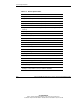
Table F-2: Minimum Hardware Configuration
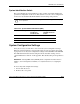
Component Minimum Specifications
Processors and
PPMs
Processor socket 1 and PPM slot 1 must be populated.
Fans Fan connectors 1, 3, and 5 must be populated and the
fan cable must be connected to the system board.
Memory * DIMM slots 1A and 2A must be populated with identical
ECC Registered DDR DIMMs.
* The maximum memory configuration is six 2-GB DIMMs.
For related information, refer to the HP ProLiant ML370 Generation 3 Server
Maintenance and Service Guide or refer to
www.hp.com/products/servers/platforms
Supported Operating Systems
To operate properly, the server must have a supported operating system. For updated
information on supported operating systems, refer to
www.hp.com/products/servers/platforms
For the latest information on Linux operating system versions and support, refer to
www.compaq.com/products/software/linux
CAUTION: If the server has a factory-installed operating system, configure the
server using the instructions in the HP Factory-Installed Operating System Software
Installation Guide or data will be lost.