
HP ProLiant ML370 Generation 3 Setup and Installation Guide


LED Indicators and Switches
HP ProLiant ML370 Generation 3 Server Setup and Installation Guide E-17
HP CONFIDENTIAL
Writer: Jennifer Hayward File Name: m-appe LED Indicators and Switches.doc
Codename: Dizzy Devil Part Number: 281992-002 Last Saved On: 12/3/02 2:48 PM
System Identification Switch
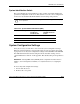
The system identification switch (SW2) is a three-position switch that identifies the
operational configuration of the server. This switch is set to the correct configuration
for the server by default. Table E-10 identifies switch settings and positions.
CAUTION: Do not alter the default setting for the server. Doing so causes improper
server operation.
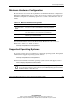
Table E-10: System Identification Switch (SW2)
Position Description Settings for
2.4-GHz and
2.8-GHz models
Settings for
3.06-GHz and above
models
1 ID0 Off Off
2 ID1 Off Off
3 ID2 Off On
System Configuration Settings
It may be necessary at some time to clear and reset system configuration settings.
When the system maintenance switch position 6 is set to the on position, the system
is prepared to erase all system configuration settings from both CMOS and NVRAM.
For additional information about locating the switch and switch settings, refer to
“System Maintenance Switch” in this appendix. The default setting for all positions is
Off.
IMPORTANT: Clearing CMOS and/or (NVRAM) deletes configuration information. Refer to
Chapter 7, “Server Configuration and Utilities,” for complete instructions on configuring the
server.
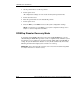
To erase all system configuration settings:
1. Power down the server.
2. Remove the access panel.