
HP ProLiant ML370 Generation 3 Setup and Installation Guide




LED Indicators and Switches
E-14 HP ProLiant ML370 Generation 3 Server Setup and Installation Guide
HP CONFIDENTIAL
Writer: Jennifer Hayward File Name: m-appe LED Indicators and Switches.doc
Codename: Dizzy Devil Part Number: 281992-002 Last Saved On: 12/3/02 2:48 PM
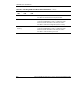
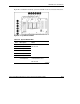
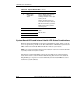
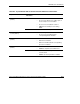
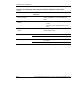
Table E-7: System Board LEDs and Internal Health LED Status Combinations
continued
System LED and Status Internal Health
LED Status
Means
DIMM failure, all slots in
one bank (amber)
Red Interleaving error: The bank is not populated
entirely or DIMMs do not all match within the
bank.
DIMM failure, all slots
(amber)
Red
• No valid or usable memory is installed in the
system.
• The banks are not populated in the correct
order.
System overtemperature
(amber)
Red System has exceeded OS cautionary level or
critical hardware level.
Red A required fan has failed. Fan (amber)
Amber A redundant fan has failed.
Red Primary power supply or both power supplies
have failed.
Power supply (off)
Amber Secondary power supply has failed.