
HP ProLiant ML370 Generation 3 Setup and Installation Guide




LED Indicators and Switches
E-12 HP ProLiant ML370 Generation 3 Server Setup and Installation Guide
HP CONFIDENTIAL
Writer: Jennifer Hayward File Name: m-appe LED Indicators and Switches.doc
Codename: Dizzy Devil Part Number: 281992-002 Last Saved On: 12/3/02 2:48 PM
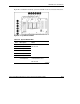
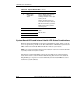
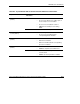
Table E-6: System Board LEDs continued
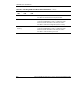
Item Description Status
8 Online spare
configuration
status
Green = Online spare memory
feature enabled. System
working normally in online spare
memory mode.
Amber = Working in fail-over
mode with online spare memory
Off = Normal memory operation.
Online spare memory feature
not being used.
9 PPM 2
10 Processor 2
11 Processor 1
12 PPM 1
Amber = Processor or PPM
failed
Off = Normal
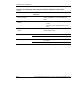
System Board LEDs and Internal Health LED Status Combinations
When the internal health LED on the front panel illuminates either amber or red, the
server is experiencing a health event. The combinations of illuminated system board
LEDs and the internal health LED in Table E-7 indicate system status.
NOTE: The system management driver must be installed in order for the internal health LED
to provide pre-failure and system conditions.
The internal system health LEDs on the front panel indicate the current hardware
status and are used to assist in initial troubleshooting. Note that in some situations,
Insight Manager 7 reports server status differently than the health LEDs because it
tracks more system attributes.