
HP ProLiant ML370 Generation 3 Setup and Installation Guide




LED Indicators and Switches
E-10 HP ProLiant ML370 Generation 3 Server Setup and Installation Guide
HP CONFIDENTIAL
Writer: Jennifer Hayward File Name: m-appe LED Indicators and Switches.doc
Codename: Dizzy Devil Part Number: 281992-002 Last Saved On: 12/3/02 2:48 PM
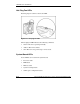
Hot-Plug Fan LEDs
Each hot-plug fan contains a dual-color LED.
Figure E-6: Hot-plug fan LEDs
The hot-plug fan LED indicates the following conditions:
• Green = The fan is operating normally.
• Amber = The fan has failed.
• Off = The fan is not powered up or is not seated.
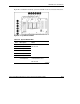
System Board LEDs
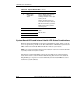
Several LEDs are located on the system board:
• Processor status
• PPM status
• Memory status
• System overtemperature
• Online spare configuration status