
HP ProLiant ML370 Generation 3 Setup and Installation Guide




LED Indicators and Switches
HP ProLiant ML370 Generation 3 Server Setup and Installation Guide E-9
HP CONFIDENTIAL
Writer: Jennifer Hayward File Name: m-appe LED Indicators and Switches.doc
Codename: Dizzy Devil Part Number: 281992-002 Last Saved On: 12/3/02 2:48 PM
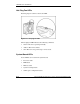
Hot-Plug Power Supply LEDs
Determine the hot-plug power supply status by noting the color of the power supply
LED located adjacent to the AC inlet.
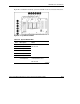
Figure E-5: Hot-plug power supply LEDs
Table E-5: Hot-Plug Power Supply LEDs
Item Description
1 Secondary (redundant) power supply
2 Primary power supply
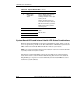
When the power supply LED is off, the following conditions may exist:
• No AC power is available.
• The power supply has failed.
• The power supply is in standby mode.
• The power supply has exceeded the current limit.
When the power supply LED is green, power is applied and the power supply is
functioning properly.