
HP ProLiant ML370 Generation 3 Setup and Installation Guide




LED Indicators and Switches
E-8 HP ProLiant ML370 Generation 3 Server Setup and Installation Guide
HP CONFIDENTIAL
Writer: Jennifer Hayward File Name: m-appe LED Indicators and Switches.doc
Codename: Dizzy Devil Part Number: 281992-002 Last Saved On: 12/3/02 2:48 PM
Unit Identification LEDs
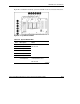
The server includes unit identification (UID) LEDs with switches on both the front
and rear panels. The UID LEDs indicate activity status and can be toggled on and off
by the hardware push button or Insight Manager 7.
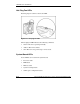
The rear UID LED provides a visual reference for locating an individual server in a
rack of servers. The rear UID contains an integrated button to activate or deactivate
the LED.
Figure E-4: Rear UID LED and switch (rack model)
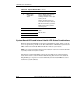
The rear UID LED indicates the following states:
• Blue = The switch is activated.
• Blue flashing = The system is being monitored remotely.
• Off = The switch is deactivated.
NOTE: You can activate and deactivate the UID LED from either the front or rear UID
switch.