
HP ProLiant ML370 Generation 3 Setup and Installation Guide
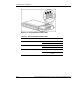


LED Indicators and Switches
HP ProLiant ML370 Generation 3 Server Setup and Installation Guide E-5
HP CONFIDENTIAL
Writer: Jennifer Hayward File Name: m-appe LED Indicators and Switches.doc
Codename: Dizzy Devil Part Number: 281992-002 Last Saved On: 12/3/02 2:48 PM
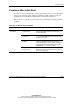
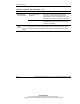
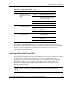
Table E-3: Hot-Plug SCSI Hard Drive LED Combinations
Activity
LED
Online
LED
Fault
LED
Status
On Off Off
Do not remove the drive. Removing a drive during this
process causes data loss.
The drive is being accessed and is not configured as part of
an array.
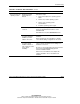
On Flashing Off
Do not remove the drive. Removing a drive during this
process causes data loss.
The drive is rebuilding or undergoing capacity expansion.
Flashing Flashing Flashing
Do not remove the drive. Removing a drive during this
process causes data loss.
The drive is part of an array being selected by the Array
Configuration Utility.
-Or-
The Options ROMPaq is upgrading the drive.
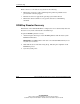
Off Off Off OK to replace the drive online if a predictive failure alert is
received and the drive is attached to an array controller.
The drive is not configured as part of an array.
-Or-
If this drive is part of an array, a powered-on controller is not
accessing the drive.
-Or-
The drive is configured as an online spare.
continued