
HP ProLiant ML370 Generation 3 Setup and Installation Guide


LED Indicators and Switches
E-2 HP ProLiant ML370 Generation 3 Server Setup and Installation Guide
HP CONFIDENTIAL
Writer: Jennifer Hayward File Name: m-appe LED Indicators and Switches.doc
Codename: Dizzy Devil Part Number: 281992-002 Last Saved On: 12/3/02 2:48 PM
Front Panel LEDs
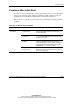
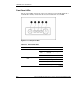
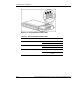
The set of five LEDs on the front of the server indicates system health. Figure E-1
and Table E-1 identify and describe the location and function of each LED.
Figure E-1: Front panel LEDs
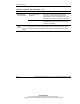
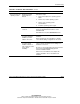
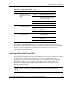
Table E-1: Front Panel LEDs
Item Description Status Means
Blue Activated
Flashing
blue
System being managed
remotely
1 UID switch and LED
Off Deactivated
Green Normal (system on)
Amber System degraded
Red System critical
2 Internal system health
LED
Off Normal (system off)
continued