
HP ProLiant ML370 Generation 3 Setup and Installation Guide


Troubleshooting
D-10 HP ProLiant ML370 Generation 3 Server Setup and Installation Guide
HP CONFIDENTIAL
Writer: Jennifer Hayward File Name: l-appd Troubleshooting.doc
Codename: Dizzy Devil Part Number: 281992-002 Last Saved On: 12/3/02 2:43 PM
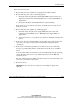
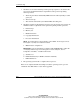
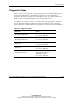
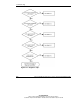
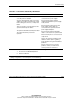
Table D-5: Is the Internal Health LED Green?
Answer Possible Reasons Possible Solutions
No, it’s
amber
A processor is in pre-failure condition.
A DIMM is in pre-failure condition.
One memory bank is valid, but another
bank is missing a DIMM.
One memory bank is valid, but another
bank has mismatched DIMMs installed.
One memory bank is valid, but another
bank has an unsupported DIMM type
installed.
A memory bank has failed, and the online
spare memory feature has copied
information to the redundant bank.
A redundant fan has failed.
Use amber failure LEDs to identify:
• Missing components
• Degraded components
• Failed components
• Improperly installed components
Contact your authorized service
provider for replacement parts and
service.
continued