
HP ProLiant ML370 Generation 3 Setup and Installation Guide


Server Error Messages
C-2 HP ProLiant ML370 Generation 3 Server Setup and Installation Guide
HP CONFIDENTIAL
Writer: Jennifer Hayward File Name: k-appc Server Error Messages.doc
Codename: Dizzy Devil Part Number: 281992-002 Last Saved On: 12/3/02 2:39 PM
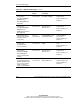
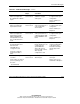
Table C-1: POST Error Messages continued
Error Code Audible
Beeps
Probable Source
of Problem
Action
207-Invalid Memory
Configuration -
Unsupported DIMM In
DIMM Socket X
Only ECC DIMMs Are
Supported.
One long,
and one short
Installed DIMMs do not
have ECC capability.
Replace DIMMs in
indicated slots.
Refer to “Memory” in
Chapter 3.
207-Invalid Memory
Configuration -
Unsupported DIMM In
DIMM Socket X
DIMM Size Parameters
Not Supported.
One long,
and one short
Installed DIMMs in the
same bank are of
different sizes.
Replace DIMMs in
indicated slots.
Refer to “Memory” in
Chapter 3.
207-Invalid Memory
Configuration - DIMMs
must be installed
sequentially.
One long,
and one short
Installed DIMMs are not
sequentially ordered.
Reinstall DIMMs in
proper order.
Refer to “Memory” in
Chapter 3.
207-Invalid Memory
Configuration -
Incomplete bank
detected in bank X
One long,
and one short
Bank is missing a
DIMM.
Install a DIMM to fill the
bank.
Refer to “Memory” in
Chapter 3.
207-Invalid Memory
Configuration –
Mismatched DIMMs
within DIMM Bank
Memory in Bank X Not
Utilized.
One long,
and one short
Installed DIMMs in the
same bank are of
different sizes.
Replace DIMMs in
indicated slots.
Refer to “Memory” in
Chapter 3.
207-Memory
Configuration Warning –
DIMM in DIMM Socket X
does not have Primary
Width of 4 and only
supports standard ECC.
One long,
and one short
Installed DIMMs have a
primary width of x8.
Install DIMMs that have
a primary width of x4.
Refer to “Memory” in
Chapter 3.
continued