
HP ProLiant ML370 Generation 3 Setup and Installation Guide


Server Cabling
6-16 HP ProLiant ML370 Generation 3 Server Setup and Installation Guide
HP CONFIDENTIAL
Writer: Jennifer Hayward File Name: g-ch06 Server Cabling.doc
Codename: Dizzy Devil Part Number: 281992-002 Last Saved On: 12/3/02 2:15 PM
Routing the Power Cord and Peripheral Device Cables
Cords and cables connected to the server rear panel are routed through a cable
management arm that prevents loose cabling in the rear of the rack and protects
connectors from damage that results when cables are disconnected improperly.
When multiple servers are installed in a rack, the cable management arm effectively
organizes the rear panel cabling.
Refer to Chapter 4, “Installing the Rack Server,” for instructions on installing the
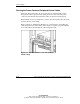
cable management arm and securing cables. Figure 6-12 shows a properly installed
server with cables routed through the cable management arm.
Figure 6-12: Server installed in a rack with properly
routed cabling