
HP ProLiant ML370 Generation 3 Setup and Installation Guide


Server Cabling
HP ProLiant ML370 Generation 3 Server Setup and Installation Guide 6-15
HP CONFIDENTIAL
Writer: Jennifer Hayward File Name: g-ch06 Server Cabling.doc
Codename: Dizzy Devil Part Number: 281992-002 Last Saved On: 12/3/02 2:15 PM
Rack Cabling Guidelines
After you have installed all internal options, replaced the server access panel, and
configured the server for a rack, you are ready to connect the power cord and
peripheral devices.
CAUTION: Always connect peripheral devices before connecting power to the
server. An improper cabling connection sequence can result in electrical damage to
peripheral devices.
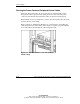
Rear panel connectors on the server include:
• Video (blue)
• Parallel (burgundy)
• RJ-45
• Serial (teal)
• VHDCI SCSI
• Auxiliary VHDCI SCSI slot
• Mouse (green)
• Keyboard (purple)
• USB (black)
For additional rack cabling guidelines and information, refer to the Rack
Resources CD provided with the rack.