
HP ProLiant ML370 Generation 3 Setup and Installation Guide





Server Cabling
HP ProLiant ML370 Generation 3 Server Setup and Installation Guide 6-11
HP CONFIDENTIAL
Writer: Jennifer Hayward File Name: g-ch06 Server Cabling.doc
Codename: Dizzy Devil Part Number: 281992-002 Last Saved On: 12/3/02 2:15 PM
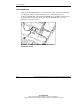
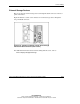
Figure 6-9: External VHDCI SCSI connector on the rear
panel
SCSI Cables and Connectors
The server supports different types of SCSI devices, connectors, and cables. In
general, SCSI cables have distinguishing characteristics:
• External SCSI cables have a round wire with securable connectors.
• Internal SCSI cables have a flat ribbon wire with push-on connectors.
• HP and Compaq branded SCSI cables are keyed so they cannot be installed
incorrectly and are labeled for easy identification and reference.
Determining Cabling Needs
The following guidelines are an overview for first-time cable connections and
installation in the server. For detailed information on cable types supported for the
server, refer to
www.hp.com/products/servers/platforms