
HP ProLiant ML370 Generation 3 Setup and Installation Guide





Server Cabling
HP ProLiant ML370 Generation 3 Server Setup and Installation Guide 6-9
HP CONFIDENTIAL
Writer: Jennifer Hayward File Name: g-ch06 Server Cabling.doc
Codename: Dizzy Devil Part Number: 281992-002 Last Saved On: 12/3/02 2:15 PM
Hot-Plug Fans
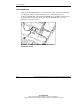
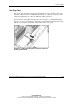
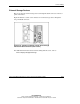
The server ships with three hot-plug fans installed in the cages attached to the center
wall. Fan cables for all fans are bundled and connect to a single fan connector on the
system board (Figure 6-8) so that no additional cabling is needed.
For instructions on installing hot-plug fans, refer to Chapter 3, “Installing Hardware
Options,” or refer to the hardware configuration and installation instructions that ship
with the server and the option label on the inside of the access panel.
Figure 6-8: Cabling hot-plug fans to the fan connector
on the system board