
HP ProLiant ML370 Generation 3 Setup and Installation Guide


Installing the Tower Server
5-6 HP ProLiant ML370 Generation 3 Server Setup and Installation Guide
HP CONFIDENTIAL
Writer: Jennifer Hayward File Name: f-ch05 Installing the Tower Server.doc
Codename: Dizzy Devil Part Number: 281992-002 Last Saved On: 12/3/02 2:14 PM
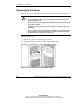
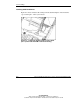
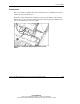
5. Insert the SmartStart CD or the operating system installation CD.
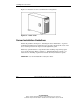
Figure 5-3: Inserting the CD into the tower server
NOTE: The CD-ROM drive may look different from the one shown in this figure.
6. Restart the server.
7. Follow the instructions provided by SmartStart or the operating system
manufacturer.
For more information about using RBSU or SmartStart to install an operating system,
refer to Chapter 7, “Server Configuration and Utilities.”
After RBSU configures the hardware for the first time, use SmartStart to install the
operating system of your choice.