
HP ProLiant ML370 Generation 3 Setup and Installation Guide


Installing the Tower Server
5-4 HP ProLiant ML370 Generation 3 Server Setup and Installation Guide
HP CONFIDENTIAL
Writer: Jennifer Hayward File Name: f-ch05 Installing the Tower Server.doc
Codename: Dizzy Devil Part Number: 281992-002 Last Saved On: 12/3/02 2:14 PM
Powering Up the Server
Power up the server after the peripheral and power cords are connected to the server.
WARNING: To reduce the risk of electrical shock or damage to the equipment:
• Do not disable the power cord grounding plug. The grounding plug is an
important safety feature.
• Plug the power cord into a grounded (earthed) electrical outlet that is easily
accessible at all times.
• Unplug the power cord from each power supply to disconnect power to the
equipment.
• Do not route the power cord where it can be walked on or pinched by items
placed against it. Pay particular attention to the plug, electrical outlet, and
the point where the cord exits from the server.
To power up the server:
1. Connect the power cords to the AC power source.
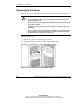
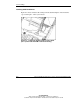
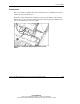
2. Open the front bezel and press the Power On/Standby button.
Figure 5-2: Pressing the Power On/Standby button