
HP ProLiant ML370 Generation 3 Setup and Installation Guide


Installing the Rack Server
HP ProLiant ML370 Generation 3 Server Setup and Installation Guide 4-19
HP CONFIDENTIAL
Writer: Jennifer Hayward File Name: e-ch04 Installing the Rack Server.doc
Codename: Dizzy Devil Part Number: 281992-002 Last Saved On: 12/3/02 2:12 PM
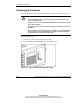
3. Observe the front panel LEDs for a successful power-up sequence.
Table 4-1 describes a successful power-up sequence.
Table 4-1: Front Panel LED Activity During the Power-Up
Sequence
Item Description
Power On/Standby LED From amber to green
Internal health LED From off to green
External health LED From off to green
NIC LED From off to green (when linked to the network)
From off to flashing green for network activity
Note: For a detailed explanation of all system LEDs, refer to Appendix E,
“LED Indicators and Switches.”
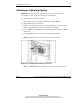
When the server powers on for the first time, the server performs a POST and
launches RBSU. After selecting initial system settings, install the operating system
and perform additional configuration tasks. For additional information about
configuring the server with RBSU, refer to the HP ROM-Based Setup Utility User
Guide.