
HP ProLiant ML370 Generation 3 Setup and Installation Guide

Installing the Rack Server
HP ProLiant ML370 Generation 3 Server Setup and Installation Guide 4-17
HP CONFIDENTIAL
Writer: Jennifer Hayward File Name: e-ch04 Installing the Rack Server.doc
Codename: Dizzy Devil Part Number: 281992-002 Last Saved On: 12/3/02 2:12 PM
Securing Cables with the Cable Management Arm
The cable management arm that ships in the rack kit with the server includes
hook-and-loop straps that are used to secure multiple server and peripheral cables to
the arm. Using the guidelines in this section enhances cable management among
several servers in a rack configuration.
Securing Server Cables
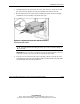
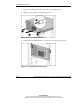
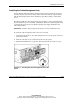
Use the cable management straps attached to the cable management arm to collect
and secure external power, network, and peripheral device cables.
IMPORTANT: Extend the server from the rack before routing cables through the cable
management arm to allow the proper amount of slack in the cables. Refer to “Extending the
Server from the Rack” in this chapter for instructions.
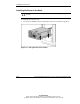
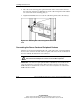
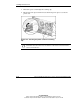
Figure 4-15: Server cables secured to the cable
management arm
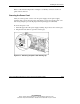
CAUTION: After securing the cables and before powering up the server, always
extend and retract the server to be sure that cables remain connected when the
server is at full extension.