
HP ProLiant ML370 Generation 3 Setup and Installation Guide

Installing the Rack Server
HP ProLiant ML370 Generation 3 Server Setup and Installation Guide 4-11
HP CONFIDENTIAL
Writer: Jennifer Hayward File Name: e-ch04 Installing the Rack Server.doc
Codename: Dizzy Devil Part Number: 281992-002 Last Saved On: 12/3/02 2:12 PM
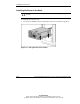
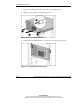
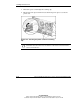
2. Carefully align the tapered ends of the server rails on the rear of the server with
the open end of the spring-load rack rail assembly at the front of the rack.
3. Be sure that both server rails are balanced within the spring-load rail assembly
and slide the server smoothly to the back of the rack.
Figure 4-8: Aligning the server rails with the rack rails
and inserting the server
CAUTION: Keep the server parallel to the floor when sliding the server rails into
the spring-load rack rails. Tilting the server up or down can result in damage to
the rails.
IMPORTANT: If the server does not slide into the rack smoothly the first time, remove it
completely and reinsert the server rails into the spring-load rail assembly.
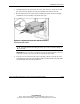
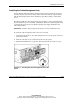
4. Once the server reaches the back of the rack, slide it all the way back out of the
rack until the spring-load rack assembly is fully extended and the rails lock. This
action initializes the rail lock for future use.