
HP ProLiant ML370 Generation 3 Setup and Installation Guide

Installing the Rack Server
HP ProLiant ML370 Generation 3 Server Setup and Installation Guide 4-9
HP CONFIDENTIAL
Writer: Jennifer Hayward File Name: e-ch04 Installing the Rack Server.doc
Codename: Dizzy Devil Part Number: 281992-002 Last Saved On: 12/3/02 2:12 PM
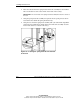
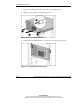
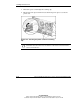
5. Insert the two tabs into the holes that you marked on the inside of the rear of the
rack.
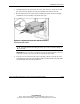
Figure 4-6: Inserting the spring-load rails into the rear
of the rack
NOTE: Other rack devices are removed for clarity.
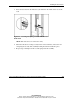
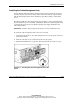
6. When the rail tabs are resting securely in the vertical rail holes, release the rail
and spring release tabs. The assembly locking mechanism clicks into place.
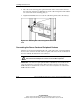
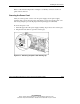
7. Repeat steps 2 through 6 for the second spring-load rail assembly.