
HP ProLiant ML370 Generation 3 Setup and Installation Guide


Installing the Rack Server
4-6 HP ProLiant ML370 Generation 3 Server Setup and Installation Guide
HP CONFIDENTIAL
Writer: Jennifer Hayward File Name: e-ch04 Installing the Rack Server.doc
Codename: Dizzy Devil Part Number: 281992-002 Last Saved On: 12/3/02 2:12 PM
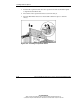
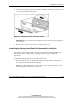
To install the cage nuts:
1. Position one of the cage nuts on the inside of a vertical rail on the front of the
rack.
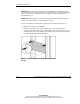
2. Compress the sides of the cage nut and insert both lips into the square cutout on
the rail.
NOTE: Use a fitting tool as an aid to help install the cage nuts, if needed.
Figure 4-3: Inserting cage nuts
3. Repeat steps 1 and 2 for a second cage nut.
Installing Server Rails
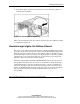
To install the server rails on the server:
IMPORTANT: Install the server rails with the smooth side of the rail against the server
chassis.
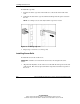
1. Align the four keyholes on one of the server rails with the four spools on the side
of the chassis. The closed, tapered end of the rail points toward the rear panel of
the server.