
HP ProLiant ML370 Generation 3 Setup and Installation Guide


Installing Hardware Options
3-68 HP ProLiant ML370 Generation 3 Server Setup and Installation Guide
HP CONFIDENTIAL
Writer: Jennifer Hayward File Name: d-ch03 Installing Hardware Options.doc
Codename: Dizzy Devil Part Number: 281992-002 Last Saved On: 12/3/02 12:45 PM
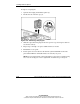
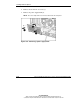
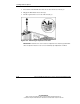
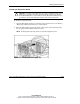
2. Remove the two Torx T-15 screws (1).
3. Remove the power supply blank (2).
NOTE: The server ships with a Torx T-15 tool attached to the rear panel.
Figure 3-58: Removing a power supply blank