
HP ProLiant ML370 Generation 3 Setup and Installation Guide

Installing Hardware Options
HP ProLiant ML370 Generation 3 Server Setup and Installation Guide 3-61
HP CONFIDENTIAL
Writer: Jennifer Hayward File Name: d-ch03 Installing Hardware Options.doc
Codename: Dizzy Devil Part Number: 281992-002 Last Saved On: 12/3/02 12:45 PM
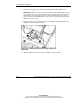
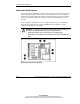
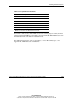
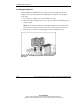
Table 3-12: System Fan Locations
Item Description
1 Processor fan 1
2 Processor fan 3
3 I/O fan 5
4 Redundant I/O fan 6
5 Redundant processor fan 2
6 Redundant processor fan 4
Note: Fan locations are labeled in the chassis.
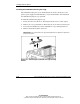
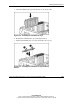
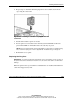
Fan failure is indicated by amber LEDs located on each hot-plug fan and by the front
panel internal health LED. For fan failures, the internal health LED illuminates red in
nonredundant mode and amber in redundant mode.
For additional information, refer to Appendix C, “Server Error Messages,” and
Appendix E, “LED Indicators and Switches.”