
HP ProLiant ML370 Generation 3 Setup and Installation Guide

Installing Hardware Options
3-60 HP ProLiant ML370 Generation 3 Server Setup and Installation Guide
HP CONFIDENTIAL
Writer: Jennifer Hayward File Name: d-ch03 Installing Hardware Options.doc
Codename: Dizzy Devil Part Number: 281992-002 Last Saved On: 12/3/02 12:45 PM
Redundant Hot-Plug Fans
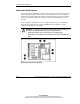
The server supports redundant hot-plug fans to provide proper airflow to the system.
In the standard configuration, three fans cool the system. If any one of the primary
fans fails, the system monitors the fan status and shuts down to prevent any thermal
damage to components. When the system is powered up, POST displays an error
message.
In the redundant configuration, six fans cool the system. If any one of the primary
fans fails, the system detects the paired redundant fan and continues to operate
without any interruption or downtime.
WARNING: To reduce the risk of personal injury from hazardous energy or of
damage to the equipment when working on energized servers:
• Remove all watches, rings, and any other loose fitting jewelry.
• Avoid the use of conductive tools inside the server that could bridge live
parts.
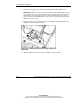
Figure 3-50: System fan locations