
HP ProLiant DL/ML370 G6 Servers graphics card power cable kit installation instructions

300-W graphics card
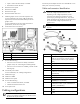
A 300-W graphics card using Cable 1 (P/N: 506302-001). Both
the 75-W 2x3 pin connector and the 150-W 2x4-pin connector are
connected.
Connecting the Y cable (optional)
WARNING: Only connect the connectors needed to
obtain the wattage requirements for the card.
Depending on the wattage requirements, not all
connectors may need to be connected. To avoid
personal injury or damage to the server, only use the
cables specified and as indicated in this document and
do not exceed the wattage requirements for the
graphics card.
IMPORTANT: The Y cable is used only when connectors
P9 and P12 are unavailable. When the Y cable is used,
hard drive backplanes 2 and 3 are unavailable.
To connect the Y cable:
1. Connect the black connector on the Y cable to the power
adapter connector on the required 300W graphics card power
cable.
2. Connect the white connectors on the Y cable to connectors BP2
and BP3 on the power supply backplane in one of the
following configurations:
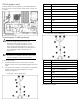
o Using cable 1: (P/N: 506302-001)
Item Description
1 Graphics card
2 75-W 2x3-pin connector
3 150-W 2x4-pin connector
4 2x5-pin power connector
5 Cable 1 (P/N: 506302-001)
6 Black connector for the graphics card power
cable
7 Y-Cable (P/N: 537229-001)
8 White connectors for the hard drive backplane
9 Backplane 2 power cable
10 Backplane 3 power cable
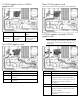
o Using cable 2 (P/N 509680-001)
Item Description
1 Graphics card
2 75-W 2x3-pin connectors (3)
3 2x5-pin power connector
4 Cable 2 (P/N: 509680-001)
5 Black connector for the graphics card power
cable
6 Y-Cable (P/N: 537229-001)
7 White connectors for the hard drive backplane
8 Backplane 2 power cable
9 Backplane 3 power cable
The installation is complete.