
HP ProLiant DL/ML370 G6 Servers graphics card power cable kit installation instructions

o Open or remove the tower bezel, as needed.
o Extend the server from the rack.
3. Remove the access panel.
4. Remove the air baffle.
5. Remove the fan cage.
6. Remove the black cable cover.
7. Install the graphics card in a x16 PCIe expansion slot.
For more information such as bus width and electrical
requirements, see the documentation that ships with the
graphics card.
For more information on the server PCIe slot technical
specifications, see the server user guide.
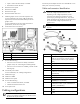
8. Locate the P9 and P12 connectors.
Item Description
1 P12 connector
2 P9 connector
9. Do one of the following:
o If the P9 or P12 connectors are already connected to
graphics cards, see "Connecting the Y-cable (optional)."
o If the P9 or P12 connectors are available, proceed with the
following step.
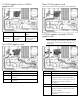
10. Connect the power cables.
For more information, see "Cabling configurations."
11. Install the fan cage.
12. Install the air baffle.
13. Install the access panel.
14. Do one of the following:
o Close or install the tower bezel, as needed.
o Slide the server back into the rack.
15. Power up the server.
Cabling configurations
IMPORTANT: The following information provides basic
graphics card cabling configurations for the HP ProLiant
DL/ML370 Server (G6 or later).
Connect the power adapter connector to an available P9 or P12
video power connector (not shown).
Cable and connector identification
WARNING: Only connect the connectors needed to
obtain the wattage requirements for the card.
Depending on the wattage requirements, not all
connectors may need to be connected. To avoid
personal injury or damage to the server, only use the
cables specified and as indicated in this document and
do not exceed the wattage requirements for the
graphics card.
IMPORTANT: All system board PCIe slots provide 75W
of power.
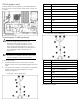
Item Description
1 Cable 1: 300-W graphics card power cable
with one 75-W 2x3-pin connector and one
150-W 2x4-pin connector (P/N: 506302-
001)
2 2x5-pin power connector
3 75-W 2x3-pin connector
4 150-W 2x4-pin connector
5 Cable 2: 300-W graphics card power cable
with three 75-W 2x3-pin connectors (P/N:
509680-001)
6 2x5-pin power connector
7 75-W 2x3-pin connectors (3)
8 Y cable (P/N: 537229-001)
9 Black connector for the graphics card power
cable (either Cable 1 [P/N: 506302-001] or
Cable 2 [509680-001])
10 White connector for backplane 2 or 3 power
cable
11 White connector for backplane 3 or 3 power
cable