
HP ProLiant DL/ML370 G6 Server PCI-X Expansion Slot Riser Option Installation Instructions
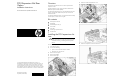
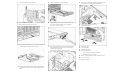

9. Install the pass-through expansion board.
10. Close the expansion slot retainer.
11. Remove the PCI-X expansion slot riser blank.
12. Remove the PCI-X expansion slot cover, and then install a PCI-X
expansion board in the PCI-X expansion slot riser.
13. To install a second PCI-X expansion board, remove the second
PCI-X expansion slot cover, and then install the PCI-X expansion
board.
14. Install the PCI-X expansion slot riser assembly.
15. Connect the PCI-X expansion slot riser power cable and the
SAS cable to the PCI-X expansion slot riser backplane.
The server is not shown for clarity.
16. Route the PCI-X expansion slot riser power cable through the
cable management box and then connect the cable to an
available system power cable.
Additional server cabling is not shown for clarity.
17. Route the SAS cable through the cable management box and
then connect it to the pass-through expansion board.
18. Install the cable management box cover.
19. Install the PCI-X baffle.
20. Install the fan cage.
21. Install the air baffle.
22. Install the access panel.
23. Do one of the following:
o Close or install the tower bezel, as needed.
o Slide the server back into the rack.
24. Connect any external cables to the PCI-X expansion boards.
25. Power up the server.
The installation is complete.