
HP ProLiant DL/ML370 G6 Server Maintenance and Service Guide

Removal and replacement procedures 29
2.
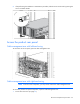
After performing the installation or maintenance procedure, slide the server into the rack by pressing the
server rail-release latches.
Access the product rear panel
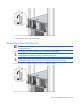
Cable management arm with left-hand swing
To access the server rear panel, open the cable management arm.
Cable management arm with right-hand swing
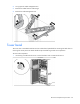
NOTE: To access some components, you may need to remove the cable management arm.
To access the product rear panel components, open the cable management arm:
1. Power down the server (on page 27).