
Compaq ProLiant ML370 G2 Service Update

Compaq ProLiant ML370 G2 Service Update 16
Rev. 1.0 Page 16 of 18
Step Action
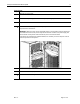
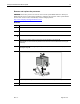
Remove Smart Array 5i controller, if equipped, at this time.
Follow these steps to do this:
a. Rotate the tops of the four anchor pins so that they align with the anchor bases .
12.
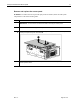
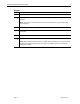
b. Grasp the controller from the front and back and gently pull away from the connectors on the
system board .
13.
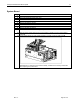
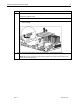
To replace the system board, reverse steps 8 through 11 and reinstall all hardware.
NOTE: Be sure that you align the seven retaining guides on the chassis with the holes on the
system board when replacing it.