
Compaq ProLiant ML370 G2 Service Update

Compaq ProLiant ML370 G2 Service Update 14
Rev. 1.0 Page 14 of 18
Replace
Step Action
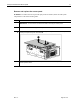
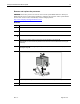
1.
Raise the processor socket lever to open the socket.
2.
Place the processor into the socket. Use the processor socket guide posts to align the
processor.
NOTE: The processor and socket are keyed to fit in one direction only. Use the holes to align
with guiding pins.
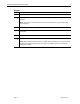
3.
Lower the socket latch to secure the assembly in the socket.
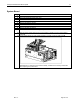
4.
Lift the heatsink retaining clip over the rear edge of the socket and hook underneath the
socket tabs.
5.
Clasp the front of the assembly clip over the front edge of the socket.
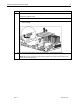
6.
Press the assembly clip down to secure the heatsink and processor assembly in the socket.
NOTE: When replacing a failed processor, run RBSU after replacing the new processor to mark
the failed processor as repaired. Refer to the setup and installation guide for more detailed
information on RBSU.