
Compaq ProLiant ML370 G2 Service Update

Compaq ProLiant ML370 G2 Service Update 12
Rev. 1.0 Page 12 of 18
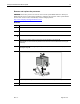
Remove and replace the access panel
WARNING: To reduce the risk of personal injury from hot surfaces, allow internal system
components to cool before touching them.
Step Action
1.
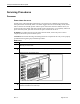
Unlock the front bezel (tower server only).
IMPORTANT: You must unlock the tower bezel before removing the access panel.
2.
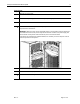
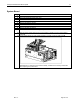
Push the release latch securing the access panel to the chassis.
3.
While holding the release latch down, slide the large access panel back about 1.5 cm (0.6
inches), then pull it away from the chassis .
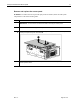
To replace the access panel, reverse step 3. When the release latch snaps into place, the
access panel is secure.