
Compaq ProLiant ML370 G2 Service Update

Compaq ProLiant ML370 G2 Service Update 10
Rev. 1.0 Page 10 of 18
Servicing Procedures
Processor
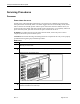
Power down the server
System power in ProLiant ML370 Generation 2 servers does not completely shut off with the
front panel Power On/Standby button. The button toggles between on and standby modes, rather
than on and off. The standby position removes power from most electronics and the drives, but
portions of the power supply and some internal circuitry remain active. To completely remove all
power from the system, you must disconnect all power cords from the server.
WARNING: To reduce the risk of injury from electrical shock, remove the power cords to
completely disconnect power from the system.
CAUTION: Electrostatic discharge can damage electronic components. Be sure you are properly
grounded before beginning any installation procedure.
Rack Server
Step Action
1.
Back up your server data.
2.
Shut down the operating system as directed in your operating system instructions.
3.
Press the Power On/Standby button.
4.
Verify that the system power LED on the front panel, near the Power On/Standby button,
is amber and that the fan noise stops.