HP ProLiant ML350e Gen8 Server User Guide
Manuals
Brands
HP Manuals
Server
HP ProLiant ML350e Gen8 Server
61
62
63
64
65
66
67
68
69
70
Hardware
options installation
68
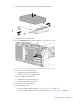
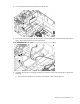
12.
Install the g
uide screws fro
m the chassis to t
he optical drive.
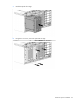
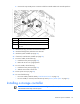
13.
Install the optical drive into
the optical drive cage. Wh
en fully inserted, the assem
bly locking latch
clicks.
1
...
...
66
67
68
69
70
...
...
147