
Compaq ProLiant ML350 Tower-to-Rack Conversion Guide

2-18 Compaq ProLiant ML350 Tower-to-Rack Conversion Guide
Compaq Confidential – Need to Know Required
Writer: Doug Warren Project: Compaq ProLiant ML350 Tower-to-Rack Conversion Guide Comments:
Part Number: 201346-001 File Name: c-ch2 Installing.doc Last Saved On: 6/27/00 9:36 AM
Step 4
Cabling the Server
1. Plug all external cables into the server.
2. If you installed a switchbox in the rack, route the CPU-to-switchbox
cables to the switchbox.
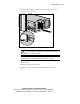
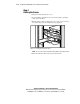
3. Bundle all of the cables, including the power cable, and secure them to
the cable management arm using the tiewraps (supplied).
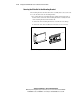
Figure 2-11. Routing and securing the cables
NOTE: The rear of the server may look different depending on the model purchased.
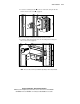
4. Extend the bundled cables down the rack cable channel.