
Compaq ProLiant ML350 Tower-to-Rack Conversion Guide

Rack Installation 2-15
Compaq Confidential – Need to Know Required
Writer: Doug Warren Project: Compaq ProLiant ML350 Tower-to-Rack Conversion Guide Comments:
Part Number: 201346-001 File Name: c-ch2 Installing.doc Last Saved On: 6/27/00 9:36 AM
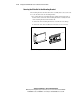
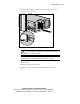
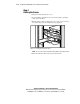
3. Press the component rail release latch on either side of the server and
slide the server into the rack.
Figure 2-7. Loading the server into the rack
WARNING: To reduce the risk of personal injury, be careful when pressing the
component rail release latches and sliding the component into the rack. The
slide rails could pinch your fingertips.
IMPORTANT: The first time you slide the component into the rack, you may have to apply
some pressure. After the first time, the ball bearings in the slide move easily.
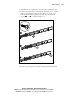
4. Slide the server in and out of the rack several times to properly align the
slide mount rails.
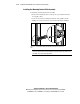
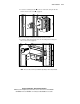
5. Tighten the mounting bracket screws.
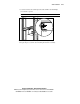
6. Secure the server by screwing the front panel thumb screws into the
rack.