
Compaq ProLiant ML350 Tower-to-Rack Conversion Guide

2-12 Compaq ProLiant ML350 Tower-to-Rack Conversion Guide
Compaq Confidential – Need to Know Required
Writer: Doug Warren Project: Compaq ProLiant ML350 Tower-to-Rack Conversion Guide Comments:
Part Number: 201346-001 File Name: c-ch2 Installing.doc Last Saved On: 6/27/00 9:36 AM
Installing the Mounting Bracket Slide Assembly
To install the mounting bracket slide assembly:
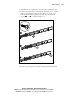
1. Position the mounting bracket according to the pencil marks made with
the template earlier.
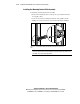
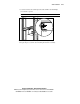
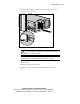
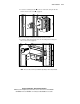
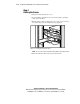
2. Secure the front of the mounting bracket first, using an M6 x 1.0-12L
Phillips screw in the bottom hole of the bracket. Do not use washers.
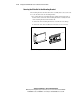
t2r2-5.eps
Figure 2-5. Securing the mounting bracket slide assembly to the front of the
rack
IMPORTANT: Do not tighten the mounting bracket screws completely until after the
server is inserted into the rack. A small amount of play helps position the brackets to the
exact width of the component being installed.