
Compaq ProLiant ML350 Tower-to-Rack Conversion Guide

Rack Installation 2-9
Compaq Confidential – Need to Know Required
Writer: Doug Warren Project: Compaq ProLiant ML350 Tower-to-Rack Conversion Guide Comments:
Part Number: 201346-001 File Name: c-ch2 Installing.doc Last Saved On: 6/27/00 9:36 AM
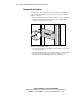
Inserting Cage Nuts into the Rack Frame
Use the fitting tool to insert cage nuts on the inside of the rails at the marked
locations.
NOTE: The cage nuts and fitting tool are included in the hardware kit supplied with the
rack.
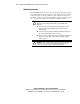
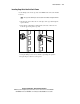
1. On the inside of the rail, hook one of the lips of the cage nut through the
square rail hole.
2. Insert the tip of the fitting tool through the other side of the hole and
hook the opposite lip of the cage nut.
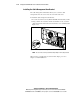
Figure 2-2. Inserting cage nuts
3. Using the fitting tool as a lever, slide the cage nut lip into position.
4. Repeat this procedure for each cage nut.