
Compaq ProLiant ML350 Tower-to-Rack Conversion Guide

2-8 Compaq ProLiant ML350 Tower-to-Rack Conversion Guide
Compaq Confidential – Need to Know Required
Writer: Doug Warren Project: Compaq ProLiant ML350 Tower-to-Rack Conversion Guide Comments:
Part Number: 201346-001 File Name: c-ch2 Installing.doc Last Saved On: 6/27/00 9:36 AM
Marking with the Template
A template is provided to mark the rack for cage nut and mounting bracket
positions. Starting at the bottom of the rack or at the top of a previously
mounted component:
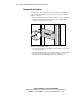
1. Place the template in the desired location with the two push tabs. Make
sure that you match the hole pattern printed on the template with the
actual holes on the rack vertical rails.
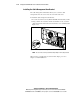
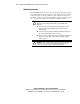
T2R2-1.EPS
Figure 2-1. Measuring with the template
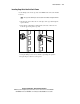
2. Use a pencil to mark locations indicated on the template for cage nuts
and mounting brackets.
3. After marking the front of the rack, flip the template over and repeat the
procedure on the back rails of the rack. Also mark the top of the
template on the rack. This helps align the next components.