
Compaq ProLiant ML350 Tower-to-Rack Conversion Guide

1-20 Compaq ProLiant ML350 Tower-to-Rack Conversion Guide
Compaq Confidential – Need to Know Required
Writer: Doug Warren Project: Compaq ProLiant ML350 Tower-to-Rack Conversion Guide Comments:
Part Number: 201346-001 File Name: b-ch1 Preparing the Server.doc Last Saved On: 7/7/00 10:05 AM
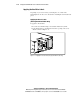
Installing Component Rails on the Server
Your conversion kit includes a set of 22-inch slide rails. A slide rail is a
mechanical assembly that consists of:
■ A component rail that is mounted to the server or component being
installed
■ A slide, which is the mechanism that accepts the component rail and is
mounted to the mounting bracket
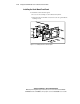
The component rails are installed in the slide when shipped and must be
removed before the component rails can be mounted to the server.
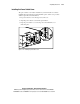
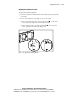
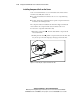
To remove the component rail from the slide:
1. Extend the component rail from the slide until the component rail
release latch clicks.
2. Holding down the latch , pull the component rail out of the slide. You
may need to give the rail a sharp tug to disengage it from the slide.
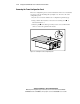
T2R1-7.eps
1
2
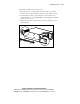
Figure 1-17. Removing the component rail from the slide