
Compaq ProLiant ML350 Tower-to-Rack Conversion Guide

1-12 Compaq ProLiant ML350 Tower-to-Rack Conversion Guide
Compaq Confidential – Need to Know Required
Writer: Doug Warren Project: Compaq ProLiant ML350 Tower-to-Rack Conversion Guide Comments:
Part Number: 201346-001 File Name: b-ch1 Preparing the Server.doc Last Saved On: 7/7/00 10:05 AM
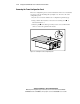
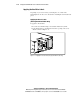
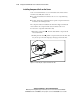
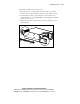
Removing the Tower Configuration Panel
The tower configuration panel covers the indentations in the server chassis that
are used to secure the mounting rails (see Figure 1-9). To remove the tower
configuration panel:
1. Lay the server on its side with the tower configuration panel facing up.
2. Using a Torx T-10 screwdriver, remove the two retaining screws as
indicated in Figure 1-9.
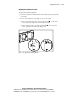
3. Slide the panel back, then up. You may need to exert a small amount
of force to release the panel from the chassis.
2
1
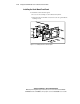
Figure 1-9. Removing the tower configuration panel