
Compaq ProLiant ML350 Tower-to-Rack Conversion Guide

Preparing the Server 1-5
Compaq Confidential – Need to Know Required
Writer: Doug Warren Project: Compaq ProLiant ML350 Tower-to-Rack Conversion Guide Comments:
Part Number: 201346-001 File Name: b-ch1 Preparing the Server.doc Last Saved On: 7/7/00 10:05 AM
Step 3
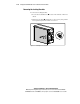
Removing Tower-Specific Chassis Components
Before beginning these procedures, make sure you understand the following
warning.
WARNING: To reduce the risk of personal injury from hot surfaces, allow the
hot-plug drives and internal system components to cool before touching them.
CAUTION: Electrostatic Discharge (ESD) can damage electronic components.
Refer to Appendix A for ESD information before you remove or install server
parts.
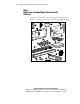
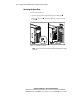
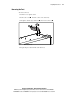
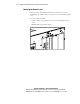
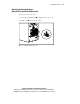
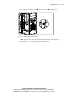
When you convert a ProLiant ML350 tower model server to a rack-mountable
model, you must first remove the following components:
■ Bezel door
■ Feet
■ Keylock latch
■ Drive cage cover (non-hot-plug hard drive models only)
■ Locking bracket
■ Tower configuration panel
After removing the components, it is necessary to set the system board switch
to a rack configuration. See “Setting the Rack Configuration System Board
Switch” in this chapter for detailed instructions.