
Compaq ProLiant ML350 Setup and Installation Guide

3-8 Compaq ProLiant ML350 Setup and Installation Guide
For use with 1-GHz or greater Intel Pentium III processor-based server models only
Compaq Confidential – Need to Know Required
Writer: Doug Warren Project: Compaq ProLiant ML350 Setup and Installation Guide Comments:
Part Number: 201345-001 File Name: d-ch3 Hardware Options Installation.doc Last Saved On: 7/24/00 9:23 AM
Installation Guidelines for SCSI Hard Drives
Consider the following guidelines when installing SCSI hard drives:
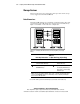
■ Install drives into the bays in the following order: 0, 1, 2, 3, 4, 5, 6.
■ Assign SCSI device IDs in the following order: 0, 1, 2, 3, 4, 5, 6.
See Figure 3-7, Figure 3-8, and Chapter 4, “Cabling Guidelines,” for
additional information.
4
0123
5
6
Figure 3-7. Non-hot-plug SCSI hard drive bay configuration
4
5
0
1
2
3
6
Figure 3-8. Hot-plug SCSI hard drive bay configuration