
Compaq ProLiant ML350 Server Overview

Compaq ProLiant ML350
Rev. 0.41 8 of 13
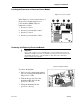
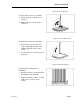
Removing and Replacing System Fan 2
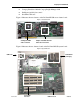
Figure 11: System Fan 2 Location Figure 12: System Fan 2 Connection
A new feature
of the ProLiant
ML350 is the a
second system
fan on the
center wall. It is
connected to the
system board
through an
opening in the
center wall.
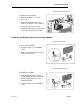
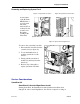
System Fan 2
Fan Cable
Figure 13: System Fan 2 Replacement
To remove the system fan 2 module:
1. Disconnect the fan cable from the
system board (see figure 12).
2. Loosen the thumbscrew (1)
securing system fan 2 to the
chassis.
3. Gently pull the system fan 2
module out and away from the
chassis (2).
4. Reverse steps 1 through 3 to
replace system fan 2 module.
Service Considerations
SmartStart 4.9
SmartStart 4.9 Assisted OpenServer Install
Starting from SS4.9, the SmartStart assisted OpenServer install has been
changed. In order to install OpenServer, the user has to input boot strings to