
Compaq ProLiant ML350 Server Overview

Compaq ProLiant ML350
Rev. 0.41 11 of 13
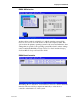
RBSU Main Menu
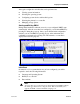
The main menu selects which configuration setting to view or modify. From
the main menu some selections bring you directly to configuration functions
while others lead to sub menus that expand the available choices.
For example, selecting System Options on the main menu displays a sub menu
of choices including OS Selection, Standard Boot Order and others. Selecting
PCI Devices, however, brings you directly to a screen that is used to view and
assign the IRQs for all PCI devices.
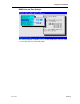
RBSU Language Selection
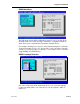
One of the selections from the main menu allows you to select the language
for the setup utility. This is one of the choices you are required to make on
initial boot.