
Compaq ProLiant ML350 Server General Troubleshooting Guide

4-20 Compaq Servers Troubleshooting Guide
Compaq Confidential – Need to Know Required
Writer: Susana Weinstein Salazar Project: Compaq Servers Troubleshooting Guide Comments:
Part Number: 161434-001 File Name: e-ch4 Diagnostic Tools.doc Last Saved On: 9/2/99 1:50 PM
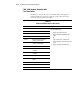
6600 - 6699, SCSI/IDE CD-ROM Drive
Test Error Codes
The 6600 series of diagnostic error codes identifies failures with the CD-ROM
cabling, CD-ROM drive, adapter board, or system board assembly. Corrective
action may require replacement of the CD-ROM cabling, CD-ROM drive,
adapter board, or system board assembly.
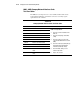
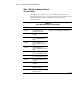
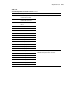
Table 4-12
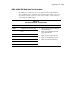
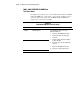
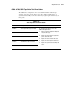
SCSI/IDE CD-ROM Drive Test Error Codes
Error Code Description Recommended Action
6600-xx CD-ROM ID failed.
6605-xx CD-ROM Read failed.
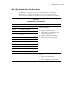
The following steps apply to error codes
6600-xx and 6605-xx:
1. Replace the CD-ROM media and retest.
2. Check and/or replace the signal cable
and retest.
3. Check the switch settings on the adapter
board (if applicable).
4. Replace the SCSI controller (if applicable)
and retest.
5. Replace the CD-ROM drive and retest.
6. Replace the system board and retest.
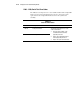
6608-xx SCSI controller test failed.